

Omnichannel Messaging for E-commerce
Short answer: Omnichannel messaging for e-commerce means sending each order event, such as a cart reminder, confirmation, shipping update, delivery code and feedback request, on the channel that works best, with a fallback if it is not delivered. WhatsApp usually carries links and buttons, and SMS is the safety net for delivery codes and failed messages.
This guide maps the order journey to channels and shows how to set it up for a store. For the e-commerce overview, see messaging for e-commerce and retail, and for the technical side see CPaaS for e-commerce.
Last updated: 24 October 2026.
The order journey, event by event
| Event | Message | First channel | Fallback |
|---|---|---|---|
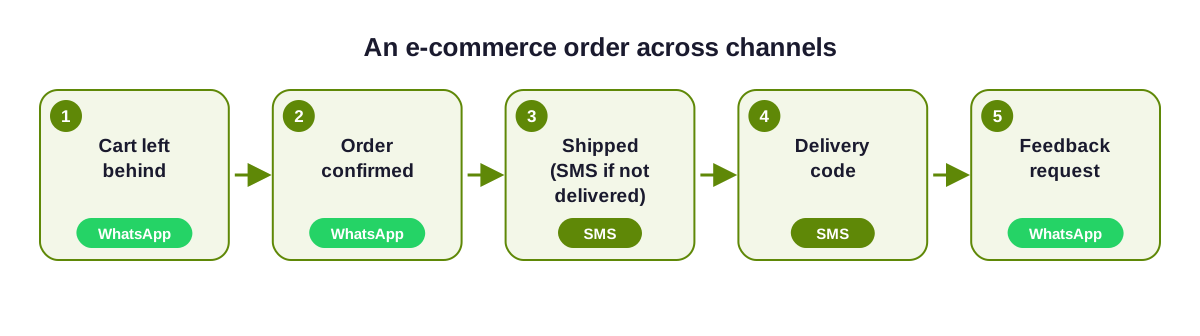
| Cart left behind | A reminder with the product and a link back | WhatsApp (opted-in customers) | SMS |
| Order placed | Confirmation with order number | SMS | |
| COD order | Ask the customer to confirm before dispatch | SMS, then voice | |
| Shipped | Tracking link and expected date | SMS | |
| Out for delivery | Delivery code or rider details | SMS | Voice call |
| Delivered | Feedback request, with a tap to reply | ||
| Return requested | Pickup details and status | SMS |
The journey in one picture
How to set it up for your store, step by step
Connect your store events
Send order, shipping and cart events from your store to the platform. Pre-built webhooks exist for Shopify and WooCommerce, and a custom store can use the API. See WhatsApp API for Shopify.Record consent at checkout
Add a clear tick box for WhatsApp updates and store it with the order. Only message the channels the customer agreed to.Write one message per event and channel
Draft the WhatsApp version and a shorter SMS version. Register the SMS on DLT and submit the WhatsApp version to Meta. See message templates.Set the fallback for each event
Use the table above as a start. Give delivery codes an SMS-first order, and keep a call for COD confirmation. See fallback routing.Add a chatbot for the questions that follow
Customers reply to ask where an order is or to return it. An AI chatbot with human handoff can answer the routine ones.Test with a real order, then review reports
Place a test order, force a failure and check each message. After launch, compare delivery reports by channel and adjust the order.
Rules to keep in mind
- Transactional messages, such as order updates, follow a different template category from promotions. Offers need consent and DND checks. See DND compliance in India.
- WhatsApp business-initiated messages use Meta-approved templates, and free-form replies are allowed for 24 hours after the customer's message.
- Do not message customers who have not opted in, even if you have their number from an order.
Related pages
See omnichannel messaging use cases, the WhatsApp Business API, bulk SMS and messaging pricing in India.
E-commerce omnichannel questions
Which channel should an online store use first?
WhatsApp for confirmations, tracking and feedback, because it carries links and buttons. SMS for delivery codes and as the fallback.
Can I confirm cash-on-delivery orders with omnichannel messaging?
Yes. Send a confirmation on WhatsApp, fall back to SMS if it is not delivered, and use a call for orders that still need confirming.
Do I need a Shopify or WooCommerce plugin?
Pre-built webhooks exist for both. A custom store can connect through the REST API and webhooks.
Can I send cart reminders to everyone?
Only to customers who agreed to receive them on that channel. Marketing messages also follow consent and DND rules.

Ready to unify your business communication?
Tell us what you want to send and on which channels, and our team will help you get set up on your own branded panel.