

Omnichannel Messaging API: One API for Every Channel
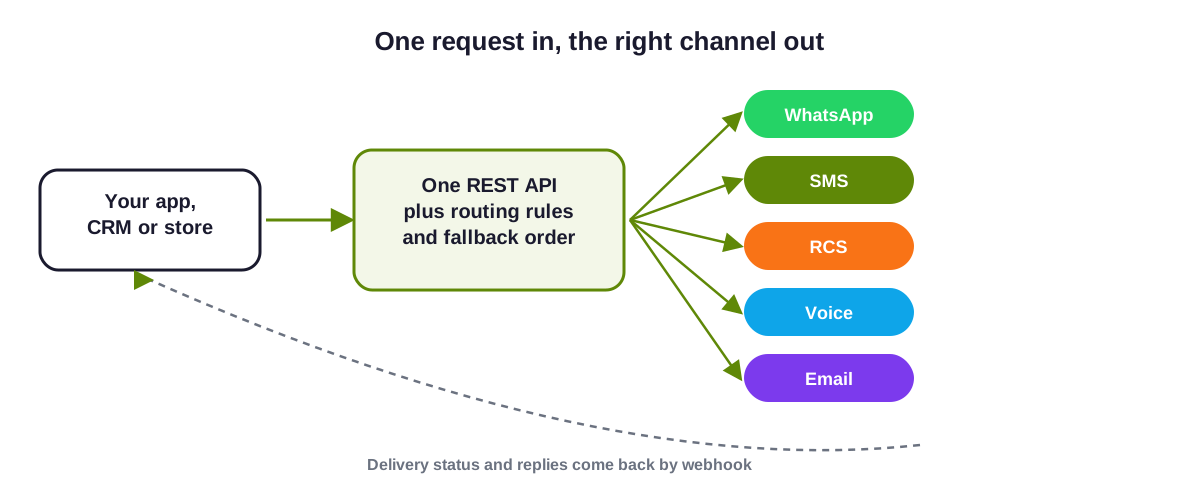
Short answer: An omnichannel messaging API lets your app, CRM or store send WhatsApp, SMS, RCS, voice and email messages through one integration, and receive delivery status and replies on webhooks. Instead of building and maintaining a separate integration for each channel, you send one request and let routing rules and a fallback order pick the channel.
This guide explains how that works for a developer, step by step. It describes the flow in general terms. The current endpoints, request fields and limits are in the API documentation, and the team can confirm what applies to your plan.
Last updated: 24 October 2026.
What you handle, and what the platform handles
| Task | Your system | The platform |
|---|---|---|
| Triggering a message | Calls the API when an event happens. | Accepts the request and queues it. |
| Choosing the channel | Sends the customer's number and the message type. | Applies the channel order and the customer's opt-in. |
| Sending | Passes the template name and variables. | Sends the approved version for each channel. |
| Delivery status | Receives it on a webhook endpoint. | Reports delivered, failed or pending. |
| Fallback | Sets the order and wait time in advance. | Sends on the next channel if the first was not delivered. |
| Records | Stores the result against the customer. | Keeps delivery reports. |
How the flow works
Send your first omnichannel message, step by step
Get an API key
Generate a key in your dashboard and keep it on the server side. Never put it in a browser or a mobile app. See authentication in the documentation.Finish each channel's setup
Verify your WhatsApp Business account, register on DLT for SMS and verify your RCS brand if you use it. The API can only send on channels that are set up.Create and approve your templates
Register the SMS wording on DLT and submit the WhatsApp wording to Meta. See message templates. Use the same variable names across channels to keep your code simple.Send a request
Call the API with the customer's phone number in international format, the template name and its variables. Where your account supports it, include the channel order and wait time for fallback, or rely on the defaults you set in the panel.Read the response
A successful response normally returns an identifier and a queued status, not proof of delivery. Store the identifier against the customer record so you can match the webhook later.Receive delivery status and replies
Expose an HTTPS endpoint, register it as a webhook and verify who is calling it. Update your record when status changes. See WhatsApp API webhooks and SMS delivery reports.Handle failures and retries
Log the error and check the error codes. Do not resend the same message yourself if fallback is on, or the customer may get it twice.
Developer checklist
- Use international phone formats, for example +91 and ten digits.
- Make requests idempotent in your own code, so a retry does not create a second message.
- Respect each channel's rules: opt-in, DND, calling hours and the WhatsApp 24-hour reply window.
- Keep the API key out of source control, rotate it if it leaks and limit who can see it.
- Test the fallback by forcing a failure before you go live.
Related pages
See the SMS API, WhatsApp API integration, Voice API and Email API for channel detail, and how to set up omnichannel messaging for the full plan. Questions? Request a callback.
Omnichannel messaging API questions
What is an omnichannel messaging API?
One integration that sends on several channels, such as WhatsApp, SMS, RCS, voice and email, and returns delivery status, instead of one integration per channel.
Do I still need to register on DLT and with Meta?
Yes. The API sends on channels you have set up, so SMS templates need DLT registration and WhatsApp templates need Meta approval.
How do I know a message was delivered?
Not from the first response, which usually says it was queued. Delivery status arrives later on your webhook or in the delivery reports.
Can the API fall back from WhatsApp to SMS?
Yes, if fallback is set up for the message type. The platform checks delivery and sends on the next channel after the wait time you set.
Where are the endpoints documented?
In the API documentation. Ask the team to confirm the endpoint reference that applies to your plan.

Ready to unify your business communication?
Tell us what you want to send and on which channels, and our team will help you get set up on your own branded panel.