

RCS Business Messaging
RCS Business Messaging (Rich Communication Services) upgrades a plain text message into a branded, interactive experience - rich cards, carousels, buttons and suggested replies - delivered inside a customer's default messaging app, with a verified business identity attached to every conversation.
This page covers what RCS Business Messaging is, how it compares to traditional SMS, the RCS API and automation options, and where RCS fits alongside WhatsApp and SMS in a business's messaging mix.
On this page:
What RCS Business Messaging is, and how it differs from SMS
Rich cards, buttons, branding and the RCS API for developers
Automation, chatbot use and SMS fallback for unsupported devices
Industry use cases, a full comparison table and FAQs
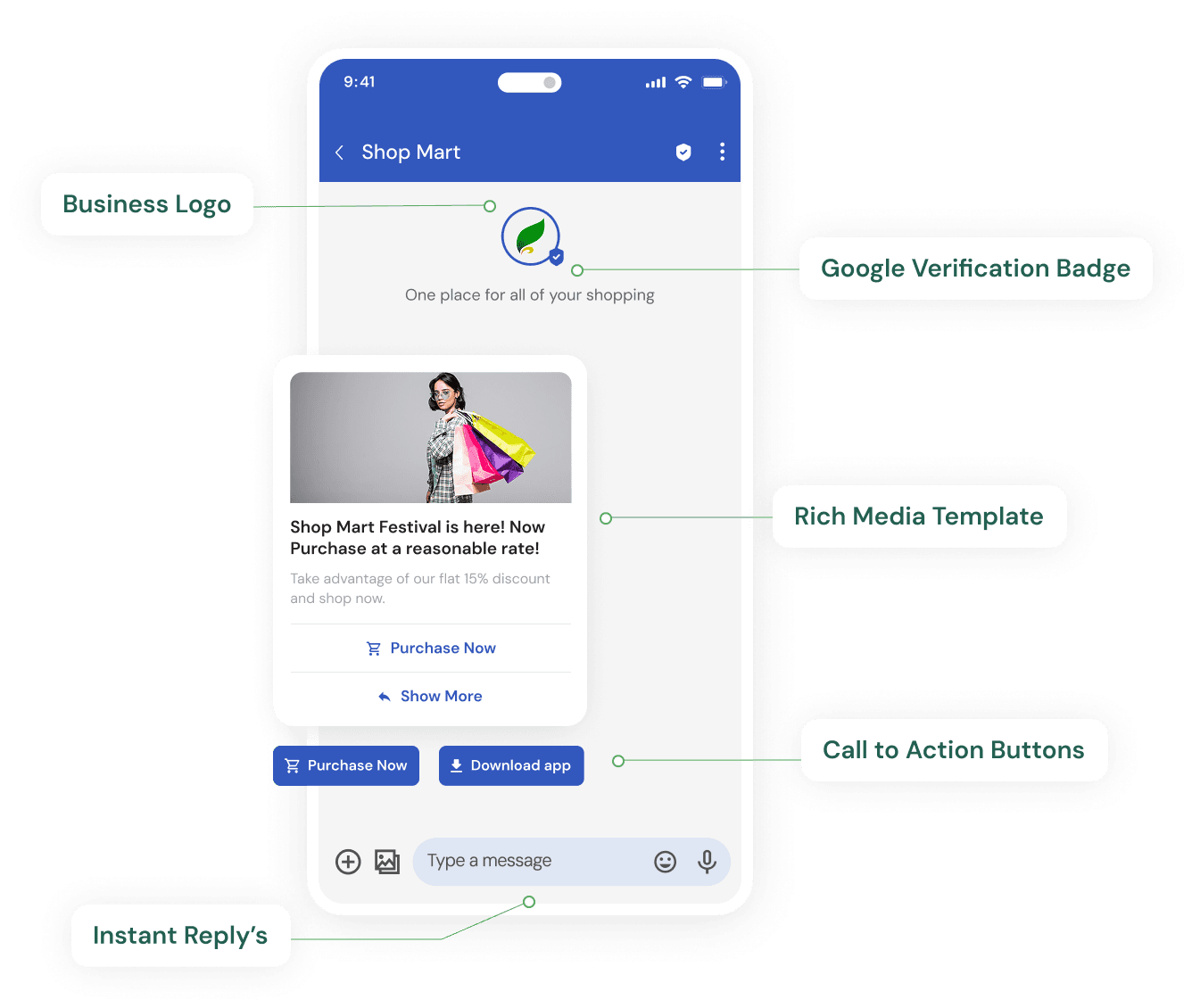
What Is RCS Business Messaging?
RCS Business Messaging is the business-facing side of Rich Communication Services, a messaging standard that replaces plain SMS with a richer format supporting images, cards, buttons and verified branding, sent through a customer's default messaging app rather than a separate download.
Where SMS is limited to 160 characters of plain text, RCS supports the same kind of visual, interactive experience customers already expect from consumer chat apps - while still arriving as a native message rather than requiring an app install.
Rich cards with images, titles, descriptions and buttons in a single message.
A verified sender identity - business name, logo and badge - shown in the conversation.
Suggested replies and suggested actions for one-tap customer responses.
Configurable fallback to SMS when a device or carrier doesn't support RCS.
Teleopedia provides RCS Business Messaging through the same dashboard and REST API used for WhatsApp and SMS, so RCS is a channel option within an existing integration rather than a separate system.
RCS vs SMS
RCS and SMS aren't competing for the same job - RCS is the richer experience where it's supported, and SMS is the dependable channel that reaches a device regardless of RCS support. Most businesses use both, with SMS configured as fallback.
| Aspect | RCS Business Messaging | SMS |
|---|---|---|
| Rich media | Images, cards and carousels supported natively | Plain text only |
| Branding | Verified business name, logo and badge shown in chat | Sender ID (alphanumeric header) only |
| Buttons | Native buttons and suggested-reply chips | None - reply only via typed keyword |
| Interactivity | Read receipts, typing indicators, one-tap actions | One-way or basic keyword-based two-way |
| Delivery capability | Depends on device and carrier RCS support | Reaches virtually any active mobile number |
| User experience | App-like, visual conversation | Simple, text-based, universally familiar |
| Automation | Chatbot flows with rich card-based responses | Keyword-based auto-replies |
| Fallback | Can fall back to SMS when unsupported | Common fallback destination for WhatsApp/RCS |
| Typical use cases | Branded promotions, rich order updates, support | OTPs, alerts, universal-reach notifications |
In practice, RCS is chosen when the visual, branded experience matters and the audience skews toward RCS-capable devices; SMS is chosen - or configured as fallback - when reaching every device matters more than richness.
Rich Cards, Buttons & Branding
The features that make an RCS message read as a branded product experience, not a text alert.
Rich Cards & Carousels
Product images, offers and multi-card carousels inside a single message.
Buttons & Suggested Replies
One-tap actions - confirm, reschedule, view order - without typing a reply.
Verified Sender Branding
A business name, logo and verified badge shown directly in the conversation.
Read Receipts
Delivery and read status, similar to a modern messaging app conversation.
RCS API, Automation & Chatbot
RCS cards, buttons and fallback rules are sent through the same authenticated REST API used for other channels. A simplified request for a rich card looks like this:
POST /v1/rcs/messages
Authorization: Bearer YOUR_API_KEY
Content-Type: application/json

{
  "to": "+919876543210",
  "card": {
    "title": "50% OFF your next order",
    "image_url": "https://cdn.yourbrand.com/offer.jpg",
    "buttons": [{ "text": "Order Now", "action_url": "https://yourbrand.com/order" }]
  },
  "fallback": "sms"
}
Automation on RCS works the same way it does on WhatsApp - a no-code flow builder can present a rich card, capture a button tap or suggested-reply selection, and branch the conversation accordingly, with handoff to a human agent when a query needs one. Delivery, read and interaction events are reported back through the same webhook contract used across every channel.
View API DocumentationTransactional, Promotional & Support Use Cases
RCS is used across the same broad categories as other business messaging channels, with the rich format adding value in different ways for each:
Transactional - order confirmations, booking updates and delivery tracking with a visual card and a direct action button.
Promotional - branded offer carousels with a "Shop Now" button, sent to opted-in contacts.
Customer support - rich replies for order status or account queries, with suggested replies guiding the conversation.
As with SMS, promotional RCS sending to Indian numbers still runs on DLT-registered content where applicable - see DLT Compliant CPaaS for how that registration works. For OTPs specifically, most businesses still route through OTP SMS API, since it doesn't depend on RCS device or carrier support.
Want To See RCS Cards In Action?
Share your number and we'll show you a live rich-card example for your industry.
RCS Business Messaging by Industry
Delivery, Engagement & Coverage Considerations
RCS support depends on the recipient's device, operating system and carrier - it isn't universal the way SMS is. Coverage has been expanding across Android devices in particular, but a business sending to a broad, unsegmented audience should still expect a mix of RCS-capable and non-capable recipients on any given send.
This is why RCS is typically paired with SMS fallback rather than used as a business's only channel: the rich experience reaches whoever supports it, and SMS quietly picks up the rest, rather than a business having to guess coverage in advance or accept an unreachable segment.
RCS + SMS Fallback
When a recipient's device or carrier doesn't support RCS, a message can be configured to fall back to standard SMS instead of failing to deliver. This is set up as a rule on your account - which channel to try first, and what to send instead - not a single behavior applied identically to every message.
Fallback across RCS, WhatsApp and SMS is explained in full, including retry logic and delivery-status-based routing, on Omnichannel Messaging Fallback.
Developer Integration
RCS sits on the same authentication, webhook and messaging contract as every other Teleopedia channel, so a team already integrated with WhatsApp or SMS adds RCS by changing a channel parameter, not by building a new integration:
One REST API
The same bearer-token authentication used across WhatsApp, SMS and Voice.
Shared Webhooks
Delivery, read and button-tap events posted to your existing webhook endpoint.
Combined Reporting
RCS performance compared alongside WhatsApp and SMS in one dashboard.
Before your first send, your RCS sending agent needs to complete Google's brand verification - see RCS Business Messaging Verification for what that process involves.
Frequently Asked Questions About RCS Business Messaging
What is RCS Business Messaging?
RCS Business Messaging is a rich, branded upgrade to SMS - supporting cards, carousels, buttons and a verified sender identity - delivered inside a customer's default messaging app rather than a separate download.
What is the difference between RCS and SMS?
RCS supports rich media, buttons, verified branding and read receipts, while SMS is plain text with universal device reach. RCS depends on device and carrier support; SMS doesn't.
What is RCS vs SMS fallback?
It's a configured rule where a message sent as RCS automatically falls back to standard SMS if the recipient's device or carrier doesn't support RCS, so delivery doesn't fail outright.
Does every phone support RCS?
No, RCS support depends on the device, operating system and carrier. This is why RCS is generally paired with SMS fallback rather than used as a sole channel for a broad audience.
What is an RCS API?
An RCS API is a REST API that lets a business send RCS messages - including rich cards, buttons and fallback rules - programmatically from its own application, instead of manually through a messaging app.
Can I automate RCS conversations with a chatbot?
Yes, no-code flow automation can present rich cards, capture button taps or suggested-reply selections, and hand off to a human agent when a conversation needs one.
Can I track engagement on RCS messages?
Yes, RCS supports read receipts and typing indicators, and button or carousel interactions are reported back through the same webhook and dashboard used for delivery tracking.
Is RCS suitable for OTPs and transactional alerts?
Yes, transactional RCS works well for OTPs and alerts that benefit from branding and read receipts, typically alongside SMS as a fallback for devices that don't support RCS.
Can RCS and WhatsApp run on the same account?
Yes, RCS, WhatsApp, SMS and Voice all run on the same Teleopedia account, dashboard and API, so they can be prioritized differently per use case.
Is RCS available for businesses in India?
Yes, RCS Business Messaging is available through Teleopedia's platform for Indian businesses, with SMS fallback and the same DLT-compliant sending discipline applied to transactional and promotional content.
How is RCS priced compared to SMS?
Pricing depends on your plan and sending volume - contact our team for details specific to your use case, since we don't publish general per-message rates on this page.
What kind of businesses use RCS the most?
E-commerce, banking and fintech, travel, and retail businesses tend to get the most value from RCS, since branded cards and buttons map directly onto orders, transactions, bookings and promotions.

Ready to unify your business communication?
Tell us what you want to send and on which channels, and our team will help you get set up on your own branded panel.