

What Is Omnichannel Messaging?
Short answer: Omnichannel messaging means reaching a customer on WhatsApp, SMS, RCS, voice or email from one platform, with one set of rules and one view of what was delivered. The message goes out on the best available channel, and if it does not arrive, it can fall back to another. That is different from sending on several channels separately.
This guide explains the idea in plain language, walks through how it works step by step, and says when it is worth setting up. For the product itself, see the omnichannel messaging platform.
Last updated: 24 October 2026.
Key terms in plain language
| Term | What it means | Example |
|---|---|---|
| Channel | A way to reach a customer. | WhatsApp, SMS, RCS, voice call, email |
| Multichannel | Using several channels, each run on its own. | A WhatsApp tool, an SMS tool and an email tool, with three reports |
| Omnichannel | Several channels connected to one customer record and one set of rules. | One panel that sends on WhatsApp, then SMS, and shows one report |
| Fallback routing | Sending on the next channel if a message is not delivered on the first. | WhatsApp first, SMS if it is not delivered |
| Opt-in | The customer's permission to be messaged on a channel. | A tick box at checkout for WhatsApp updates |
| Template | Message wording registered or approved before use. | A DLT-registered SMS or a Meta-approved WhatsApp template |
How omnichannel messaging works, step by step
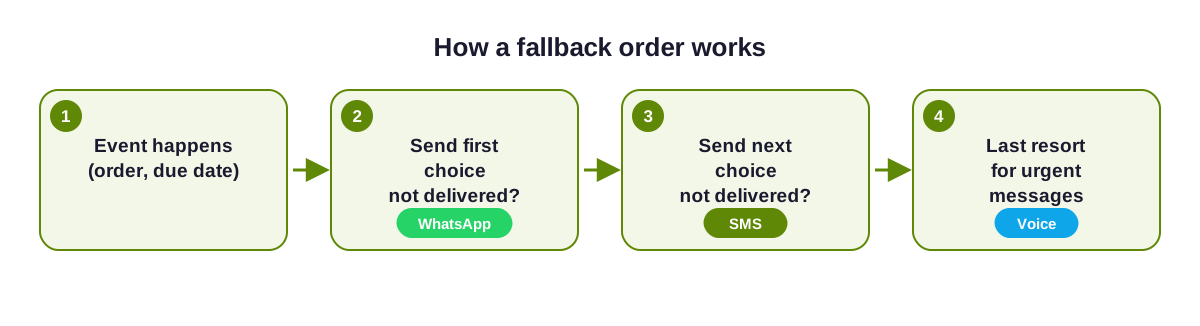
Something happens in your business
An order ships, a payment falls due, a patient books a slot or a customer asks for a login code. Your system or panel sends this event to the platform.The platform picks the channel by your rule
You decide the order in advance, for example WhatsApp first and SMS second. The customer's opt-in and the message type decide which channels are allowed.The message goes out as an approved template
SMS wording is registered on DLT. WhatsApp wording is approved by Meta. RCS needs a verified brand. The platform sends the version that fits the channel.Delivery status comes back
Each channel reports whether the message was delivered or failed. The platform reads that status instead of leaving you to check each tool.If it was not delivered, the next channel is tried
After the wait time you set, the platform sends on the next channel in your order and stops as soon as one channel delivers, so the customer gets the message once.One report shows the whole path
You see which channel delivered, how long it took and what failed. See SMS delivery reports and omnichannel fallback routing for detail.
What each channel is best for
- WhatsApp: conversations, documents, buttons and payment links, to customers who opted in.
- SMS: OTPs and alerts that must reach any active mobile number, sent on DLT-registered templates.
- RCS: branded, visual messages on phones and networks that support it, with SMS as the fallback.
- Voice: urgent reminders, OTP fallback and customers who prefer a call.
- Email: longer content such as invoices and statements.
What you need to get started
- Customer consent for each channel, recorded somewhere you can find it.
- Channel accounts: a verified WhatsApp Business account, DLT registration for SMS and a verified RCS brand if you use RCS.
- Approved templates for each message.
- A way to send: the panel for campaigns, or the API for automated messages.
When omnichannel messaging is worth it, and when it is not
It is worth it when a message really matters (a payment, a delivery, a login code), your customers use different channels, or you are tired of reconciling several tools. It is not needed when one channel does the whole job, for example a small business that only talks to existing customers on WhatsApp. Start with one channel and add a fallback when you see messages going undelivered.
Where to go next
- Omnichannel vs multichannel messaging, to see the difference in detail.
- How to set up omnichannel messaging, a 7-step guide.
- Omnichannel messaging use cases, with the channel order for each.
- The omnichannel messaging API, for developers.
- By industry: e-commerce, banks and NBFCs and healthcare.
Omnichannel messaging questions
What is omnichannel messaging in simple words?
It is sending messages to customers on several channels from one platform, with one set of rules and one report, so a message can move to another channel if the first one fails.
Is omnichannel messaging the same as omnichannel marketing?
No. Omnichannel marketing is about the customer experience across all touchpoints. Omnichannel messaging is the part that sends and tracks messages across channels such as WhatsApp, SMS, RCS, voice and email.
Do I need to use every channel?
No. Most businesses use two or three. The point is that the channels work together, not that you use all of them.
Do I need a developer?
Not to start. The panel lets you send campaigns and set a fallback order without code. A developer is needed when you want automated messages triggered by your own system.
Is it allowed in India?
Yes, with consent, DLT registration for SMS, Meta's template approval for WhatsApp, and respect for DND preferences and permitted hours on promotional messages.

Ready to unify your business communication?
Tell us what you want to send and on which channels, and our team will help you get set up on your own branded panel.